
Audio Editing
What Is Audio Clipping? How to Prevent Distorted Audio
Digital clipping occurs when a signal exceeds a stage's representable range and its peaks are cut off. Turning down that damaged signal makes it quieter, but it does not reconstruct the missing peak shape. Prevent overload while recording and processing, then measure the final export rather than relying only on a volume slider.
By Tubelexity / Updated
Measure the source and exported audio locallyPeak, dBFS and gain describe different things
Sample peak is the largest stored sample magnitude. In a normalized digital representation, 1 is full scale and is referenced as 0 dBFS. Half that amplitude is about -6.02 dBFS: 20 times log10(0.5). Gain multiplies amplitudes; adding about 6 dB nearly doubles them.
A floating-point editor may temporarily hold values above full scale, but a fixed-range output stage can clip them. Analog microphones, preamps and other stages can also distort before the digital meter reaches 0 dBFS. A low peak reading does not prove a recording was never clipped earlier.
A generated signal measured by the actual analysis engine
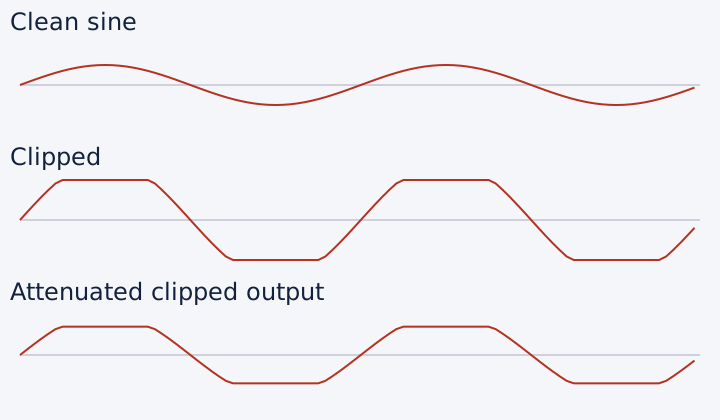
Our reference is six seconds of a 1 kHz sine wave, mono, 48 kHz, 16-bit PCM. The clean version has amplitude 0.5. A second version multiplies it by three, then hard-clamps values to the range -1 to +1 before writing PCM. This intentionally destroys the peak shape.
The generator clamps 156,000 of 288,000 samples in that second file. Tubelexity's existing LUFS analysis helper, using FFmpeg core 0.12.10, measures both files. The existing peak-normalization filter then attenuates the clipped file to a -3 dBFS sample-peak target; it does not attempt reconstruction.
The readings below are from those actual files, not estimates from the gain slider. Their small true-peak/sample-peak difference demonstrates that the measurements are not interchangeable. A steady synthetic tone is not representative program audio and these results are not universal target recommendations.
| Signal | Sample peak dBFS | True peak dBTP | Integrated LUFS |
|---|---|---|---|
| Clean sine | -6.02 | -6.02 | -9.05 |
| Gain 3x, then hard clipping | 0.00 | +0.04 | -1.45 |
| Clipped file attenuated to -3 dBFS | -3.00 | -2.96 | -4.45 |
Normalization changes level, not the missing waveform
Peak normalization applies gain based on the measured peak and a target. Loudness normalization targets a perceptual loudness measurement and may need dynamic processing when a peak ceiling would otherwise be exceeded. Neither operation knows which original values were removed by clipping.
The normalized test file has a lower maximum, but consecutive equal-height samples remain at the damaged peaks. A clipping indicator based only on near-full-scale samples may stop warning after attenuation. Listen as well as measure: a clean-looking meter is not proof that distortion has disappeared.
Compression, limiting and headroom
A compressor reduces gain above a threshold according to its ratio, attack and release. It can reduce the difference between louder and quieter passages. Makeup gain raises the processed signal again and can consume the headroom you just created. A limiter is a more restrictive form of peak control, but the exact algorithm determines what it catches.
A sample-peak limiter is not automatically a true-peak limiter. True peak estimates the reconstructed waveform between samples; it can exceed stored sample peaks. Lossy encoding can also change peaks. Measure after export, not only before compression or MP3 encoding, and do not describe a sample ceiling as a verified true-peak guarantee.
For an unclipped recording, a modest ceiling below full scale is a practical starting point, not a universal mastering specification. Different delivery requirements and program material call for different choices. For the controlled peak-normalization test we disable extra limiting so attenuation is the only change.
Prevent overload before trying to hide it
During recording, reduce input gain if the loudest expected passage overloads. Moving a microphone or choosing a different recording level can address an upstream problem that later software cannot undo. During editing, inspect levels after boosts, summed tracks and effects, not only the original track.
If distortion persists at low playback volume, compare an earlier source or another playback device to separate recorded damage from speaker overload. These browser tools analyze and adjust files; they are not an automatic restoration or mastering service. Long audio and large files can exceed browser memory, particularly on mobile, so begin with a short representative section.
Recommended workflow
- Keep the source recording. Listen for distortion and measure sample peak, true peak and integrated loudness.
- If the source is already clipped, prefer an unclipped recording or earlier project stage. Do not treat normalization as repair.
- Reduce gain before a stage that overloads. Use compression for dynamic control only when needed, and check makeup gain.
- Set a suitable output ceiling and export a short test. Leave headroom rather than aiming every peak at full scale.
- Analyze the actual exported file again, especially after lossy encoding, and listen at the loudest moments.
Frequently asked questions
Can normalizing fix clipped audio?
It can lower the level, but it cannot infer the missing samples. Re-record or use an unclipped source where possible.
Is 0 dBFS always proof of clipping?
A single full-scale sample is a warning, not a complete history. Repeated flat peaks and audible distortion provide more context; previously clipped audio can also be attenuated below 0 dBFS.
Why can true peak exceed sample peak?
The reconstructed waveform can reach maxima between stored samples. True-peak analysis estimates those inter-sample maxima rather than only reading stored values.
Can boosting bass cause clipping?
Yes. EQ boosts can increase peak amplitudes even when the original file did not overload. Leave headroom and analyze the processed export.